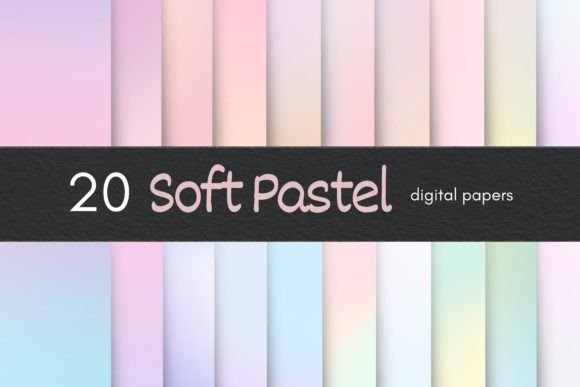
Enhance Your Digital Designs with Soft Pastel Digital Paper
In the world of digital design, finding the right background or texture can make all the difference. Whether you're creating websites, business cards, invitations, or scrapbooking layouts, a subtle and elegant aesthetic often stands out. This is where Soft Pastel Digital Papers come into play. These digital assets offer a blend of sophistication and simplicity that's ideal for modern creative projects.
What Are Soft Pastel Digital Papers?
Soft pastel digital papers are high-resolution background images designed to mimic the gentle, blended hues of traditional pastel art. Unlike bold or vibrant patterns, these backgrounds bring a sense of calm and refinement to any design. Each paper in the pack features unique marble textures and gradient transitions that evoke a soft, dreamy feel.
These papers are especially popular among designers who want to add a touch of elegance without overwhelming their content. Their muted tones work well as a backdrop for text, photos, or illustrations, allowing other elements to shine while still contributing to the overall visual harmony.
Key Features of the 20 Beautiful Soft Pastel Digital Papers Pack
- High-Quality Resolution: Every file comes at an impressive 300 DPI with dimensions of 5000 x 3334 pixels, making them suitable for both digital and print use.
- Horizontal Format: The landscape orientation is perfect for designing web pages, banners, and social media graphics where width matters more than height.
- 20 Unique Files: The collection includes 20 distinct soft pastel gradient backgrounds, each offering its own color combination and texture variation.
- Easy to Use: Compatible with Photoshop and other major graphic design software, they integrate seamlessly into your workflow.
- Digital Delivery: Instant access via a downloadable link means no waiting for physical products—just download and start creating immediately.
Why Choose Soft Pastel Gradient Backgrounds?
Designers across various industries are increasingly turning to soft pastel gradients for their projects. These backgrounds have a timeless appeal that blends well with minimalist and maximalist styles alike. Here’s why they’re becoming a go-to choice:
- Versatility: From wedding invitations to branding materials, soft pastels can be used in almost any context. They pair beautifully with monochrome fonts and photographs, helping to highlight key elements without distraction.
- Modern Aesthetic: With today's design trends leaning toward clean lines and soft colors, these papers align perfectly with contemporary tastes. They give a fresh, artistic edge to digital compositions.
- Professional Results: High-quality resolution ensures that your final output looks crisp and polished on any screen or printed material. This is crucial when presenting professional designs to clients or audiences.
- Time-Saving: Instead of spending hours creating custom gradients, you can instantly elevate your work with pre-made, ready-to-use files. This saves time while maintaining creative control over your project.
Ideal Applications for Soft Pastel Digital Papers
The beauty of this product lies in its wide range of uses. Below are some common scenarios where Soft Pastel Digital Papers can enhance your work:
- Web Design: Use them as background textures for landing pages, headers, or hero sections to create a welcoming and artistic atmosphere.
- Business Cards: Add a refined look to your brand by using a soft pastel base that complements your logo and contact information.
- Invitations: Whether it's for a birthday party, baby shower, or graduation event, these backgrounds can lend a personal and stylish touch to your invites.
- Scrapbooking: Create a cohesive theme in your digital albums with consistent pastel tones that evoke warmth and nostalgia.
- Print Materials: From brochures to posters, the high-resolution format ensures that your printed work maintains clarity and detail.
How to Get Started with the Pack
Purchasing the A pack of 20 beautiful soft pastel digital papers is straightforward. Once you complete your purchase, you’ll receive a PDF file containing a direct link to a Google Drive folder. There’s no need to register or sign up—simply click the link and choose to either download the entire folder or individual JPG files.
This instant delivery method makes it easy to begin working on your next project without delays. You’ll find the files organized and labeled clearly, so navigating the collection is hassle-free. The instructions included in the PDF guide you through the process, ensuring even beginners can get up and running quickly.
Understanding File Formats and Usage
All 20 files are in JPG format, which is widely supported and ideal for most design purposes. JPG offers a good balance between quality and file size, making it efficient for both online and offline use. Since they are horizontal, these files are particularly suited for wide-screen layouts such as website headers, blog covers, and poster designs.
While these are digital files, many can also be printed. However, it’s important to remember that printing may require specific color profiles or printer settings to maintain the intended pastel effect. Always test a small sample before mass production to ensure accuracy.
Considerations Before Using Soft Pastel Digital Papers
Although these digital papers are incredibly useful, there are a few considerations to keep in mind before incorporating them into your projects:
- Copyright Restrictions: Please note that purchasing this product does not transfer copyright. You may not redistribute, resell, share, or copy the files. Use them strictly for your own creative endeavors.
- Software Compatibility: While compatible with Photoshop, always verify if your preferred design tool supports JPG imports with layered editing capabilities.
- Color Matching: Depending on your monitor calibration, the pastel shades may appear slightly different from what you see on screen. Adjust accordingly when preparing for print or client presentations.
- Storage Space: Given the high resolution of each file, ensure you have enough storage space on your device or cloud platform to accommodate the archive.
Best Practices for Incorporating These Papers into Projects
To make the most of your Soft Pastel Digital Papers, consider the following tips:
- Layering Techniques: Use layer masks and blending modes in Photoshop to combine multiple papers or overlay them with other design elements for added depth.
- Contrast Balance: Pair light pastel tones with darker text or imagery to ensure readability and visual impact.
- Consistency in Design: Stick to one or two papers per project to maintain a unified look and avoid visual clutter.
- Client Preferences: When working with clients, ask about their style preferences before applying pastel gradients. Some may prefer bolder designs, while others appreciate the subtlety of soft tones.
- Test Different Uses: Experiment with how the papers look in both digital and print formats to understand their versatility better.
Real-World Examples of Soft Pastel Digital Papers in Action
Let’s take a look at how these digital papers can transform real-world projects:
Example 1: Wedding Invitation Design – A designer used a lavender and cream soft pastel background for a couple's wedding invite. The subtle gradient provided a romantic ambiance, complementing the hand-drawn illustrations and calligraphy font used in the layout.
Example 2: Website Header – A UX/UI designer applied a peach and pale yellow gradient as the header background for a wellness blog. The warm tones aligned with the site’s calming message and enhanced the overall user experience.
Example 3: Social Media Banner – For a boutique's Instagram page, a soft pink and mint green paper was selected as the banner background. It gave the brand a youthful yet sophisticated appearance that stood out among competitors.
Comparing Soft Pastel Papers with Other Background Types
When choosing a background for your design, it's helpful to compare options:
- Plain Solid Colors: Easy to work with but lack depth and character. Soft pastels offer a middle ground—visually engaging without being distracting.
- Abstract Textures: Can be bold or chaotic. Soft pastels provide a gentler alternative that still adds interest.
- Photographic Backdrops: Realistic but often require additional editing to match your design needs. Pastel papers are already curated for creative use.
- Watercolor Effects: Similar in softness but may not offer the same structured gradient flow. Soft pastel papers have a smooth, consistent blend.
Integrating Soft Pastel Papers into Your Workflow
For those new to using digital papers, here's a quick workflow example to help you get started:
- Open Photoshop and create a new document matching the intended project size.
- Import the chosen soft pastel paper as a background layer.
- Add text, images, or vector graphics on top, adjusting opacity or blending modes as needed.
- Export the final design in the appropriate format for your use case (e.g., JPEG for web, PNG for transparency).
With this approach, you can streamline your design process while achieving professional results. Many users report that having a variety of pastel papers allows them to switch up their mood boards and mockups effortlessly, giving them more flexibility during brainstorming sessions.
Where to Find More Inspiration
If you're looking for inspiration on how to use Soft Pastel Digital Papers, explore online design communities like Behance, Dribbble, or Pinterest. These platforms showcase countless examples of how artists and designers creatively apply similar textures in their work.
You might also try pairing these papers with minimalist fonts, floral illustrations, or soft-edged icons to build a cohesive theme. The key is to let the pastel tones serve as a foundation rather than the focal point, allowing your primary design elements to take center stage.
Final Thoughts on Choosing the Right Pastel Papers
When selecting digital papers for your projects, think about the emotional tone you want to convey. Soft pastels are known for their soothing and elegant qualities, making them excellent for designs aimed at relaxation, creativity, or celebration.
Additionally, consider the purpose of your design. If it's for a child-related project, opt for brighter pastel combinations. For corporate or luxury branding, stick to more subdued and refined hues. The 20-pack provides ample opportunity to experiment and find the perfect fit for each task.
Remember, these are digital-only files, so there's no need to worry about shipping times or packaging. Just download, open, and begin enhancing your work. With careful selection and thoughtful application, Soft Pastel Digital Papers can become a staple in your design toolkit, adding a touch of artistry to every project you tackle.